Real-time
AI Avatars
The ultimate technical manual for deploying PikaStream AI agents that join Google Meet calls with synchronized video, voice cloning, and agentic intelligence.
01. The Digital Presence Evolution
"In the era of remote collaboration, your physical absence is no longer a barrier to professional participation."
The concept of a 'meeting participant' is undergoing a fundamental shift. Traditionally, remote meetings required a human to be physically present behind a camera, managing their environment, lighting, and audio manually. PikaStream 1.0 disrupts this paradigm by introducing the **Stateful AI Avatar Protocol**. We aren't just talking about a chatbot with a profile picture; we are talking about a real-time, low-latency video stream that synchronizes an AI's cognitive output with human-like visual and vocal feedback.
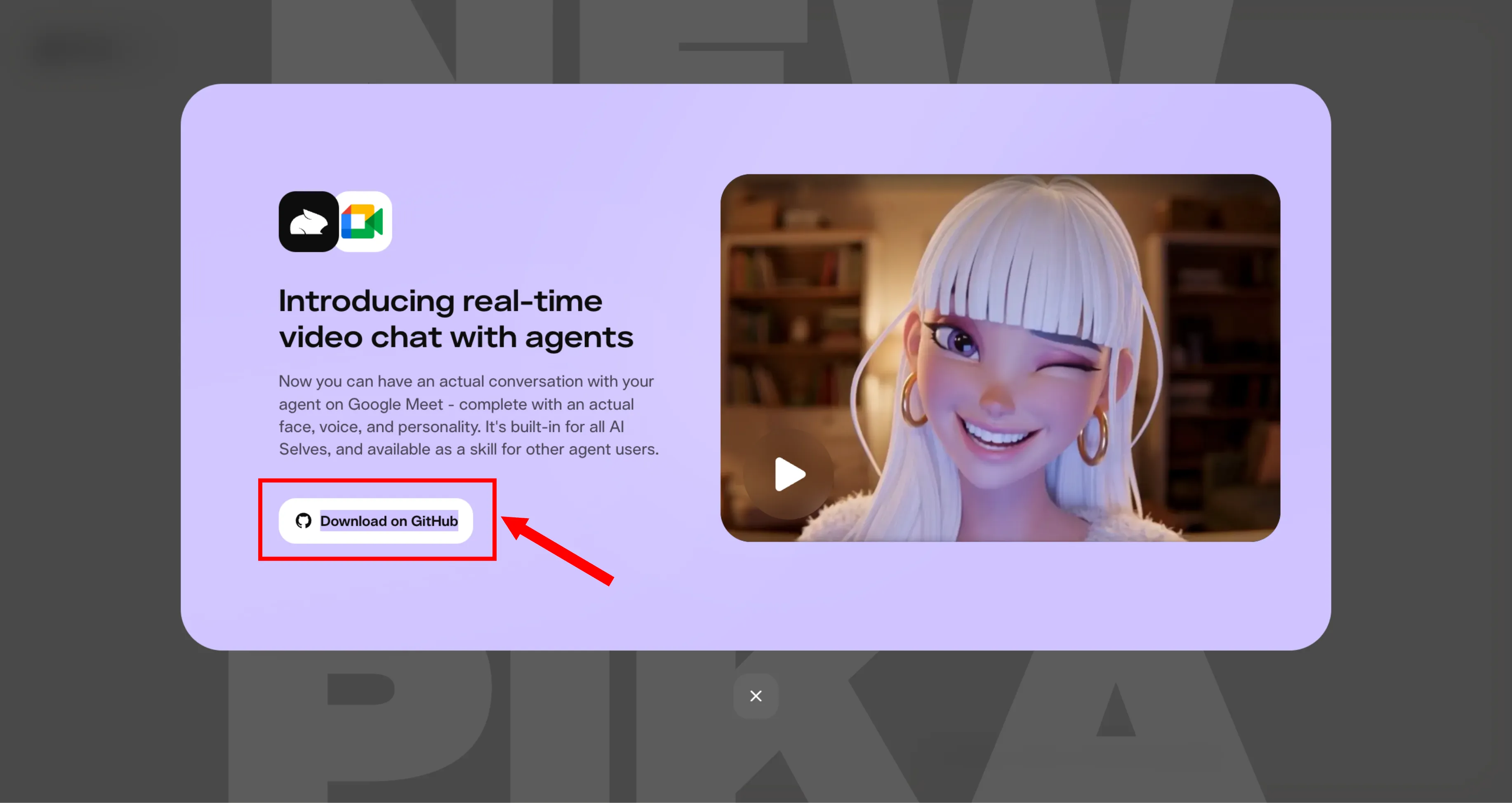
Platform Overview
The Pika.me interface showcasing the seamless integration of AI Selves into professional meeting environments.
Communication relies on approximately 70% non-verbal cues. Text-based interaction, while efficient for data transfer, fails to build the rapport and trust necessary for high-stakes professional environments. PikaStream addresses this 'rapport gap' by providing a visual anchor for the AI. When the AI speaks, its avatar moves in sync. When it listens, its avatar maintains natural micro-expressions. This continuity transforms the AI from a 'tool' into a 'colleague.'
The engine behind PikaStream is built on a distributed rendering architecture. Instead of processing heavy video synthesis on your local machine, the heavy lifting is offloaded to Pika's specialized GPU clusters. This ensures that even users on low-powered laptops can deploy high-fidelity avatars into 4K Google Meet sessions without frame drops or synchronization drift.
02. What are Pika Skills?
Modular intelligence designed for the modern AI agent. Skills are the building blocks of Pika's agentic future.
Skill Definition
A Pika Skill is a self-contained module that extends the capabilities of AI coding agents (like Claude Code, OpenClaw, or bespoke internal bots). Unlike static scripts, Skills are 'aware' of their own configuration and requirements.
- SKILL.md — The Intelligence Protocol
- scripts/ — The Executable Layer
- requirements.txt — Dependencies
How Agents Use Skills
When you install a skill into your agent workspace, the agent automatically detects the `SKILL.md` file. This markdown file doesn't just contain documentation; it contains instruction sets that the agent parses to understand:
"When should I activate this skill?"
"How do I map user intent to these specific scripts?"
"What environment variables do I need to verify first?"
The `pikastream-video-meeting` skill is the crown jewel of the Pika Skills ecosystem. It is designed to act as a bridge between the agent's internal reasoning and the external world of video conferencing. By providing the agent with the ability to 'join' a meeting, we are essentially giving it a physical presence in the digital office.
Core Features of the Meeting Skill:
01 / Identity Integration
Dynamic avatar synthesis based on agent context or predefined visual templates.
02 / Vocal Synthesis
High-fidelity voice cloning from short 15-second audio samples, localized to your environment.
03 / Financial Gateway
Integrated balance checks and automated payment link generation for continuous service.
04 / Logic & Memory
Context-aware conversation leveraging your workspace history and identity for informed dialogue.
03. The Developer Portal Setup
Your journey starts at the core of Pika Labs. Before deploying your first agent, you must establish your developer credentials.
Step 1: Authorization
Navigate to pika.me/dev/login. This specialized portal is distinct from the consumer Pika interface. It provides the low-level API access required for real-time streaming services. Authentication can be handled via Google, Phone, or traditional email credentials.
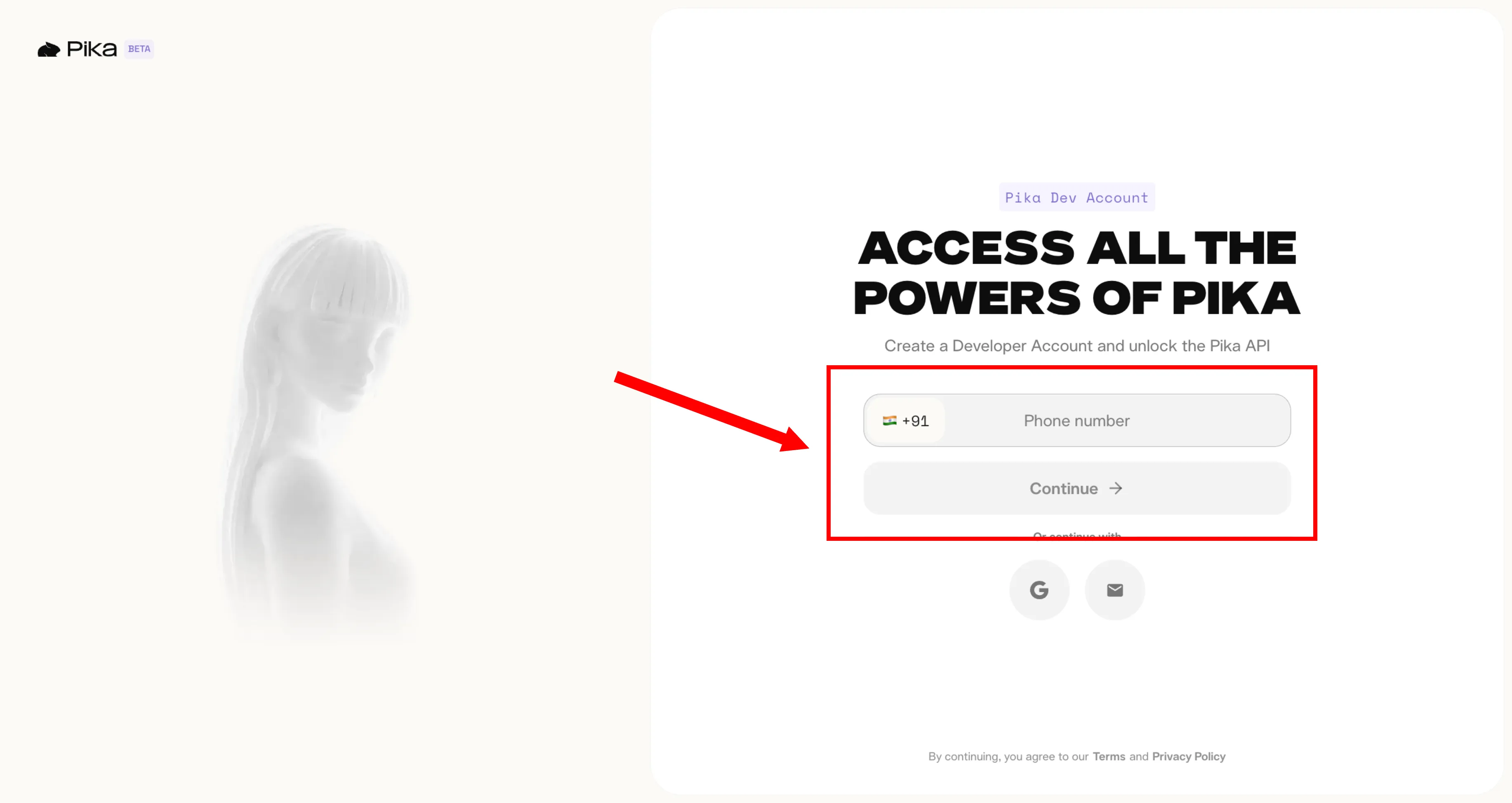
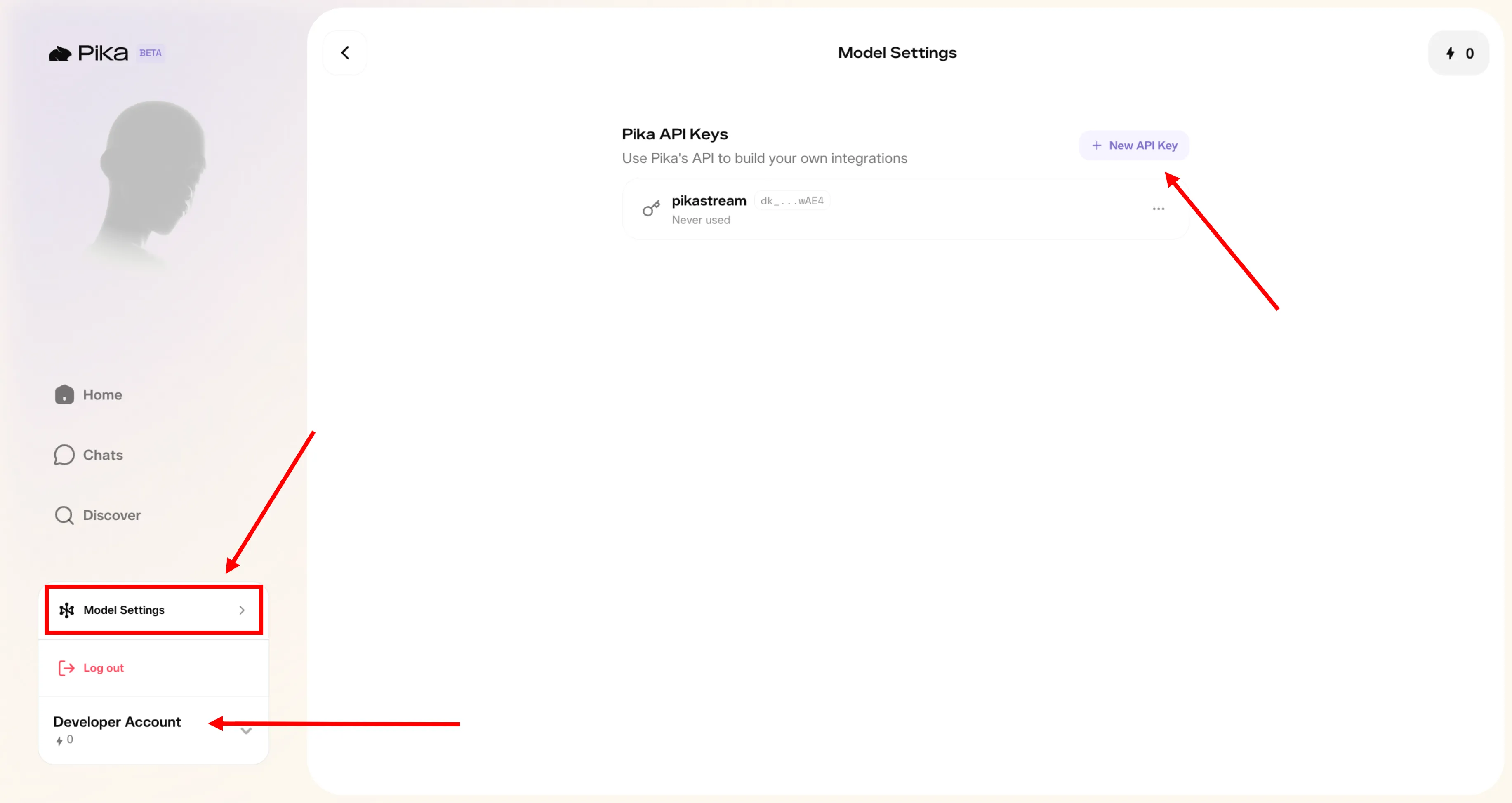
Step 2: Accessing Model Settings
Once authenticated, locate the **"Developer Account"** button in the lower secondary navigation menu. From there, select **"Model Settings"**. This dashboard acts as the command center for your API integrations. Here you can monitor your token usage, create new keys, and configure the default behavior of your AI agents across different Pika models.
Step 3: API Key Generation
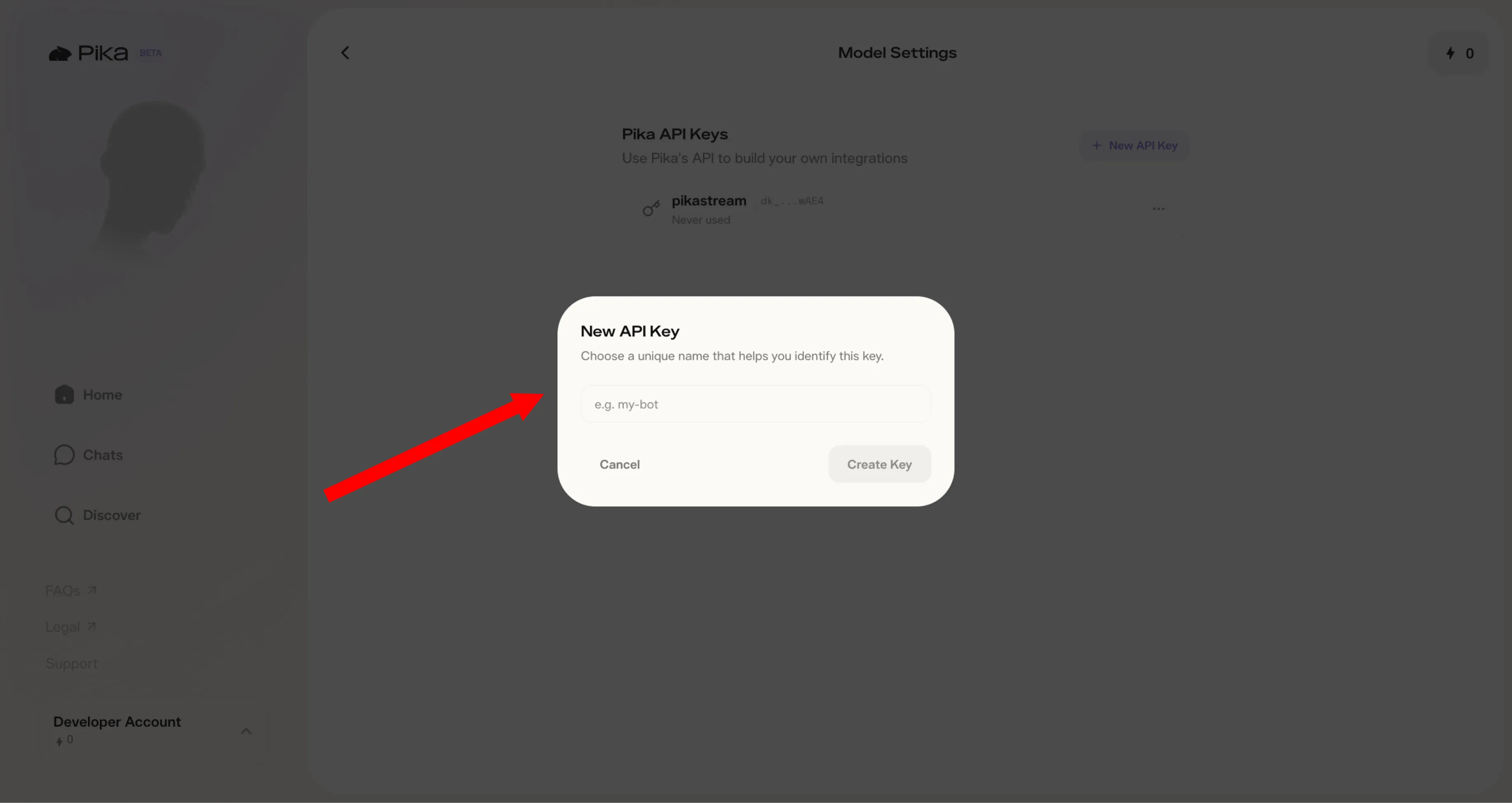
Click on the **"+ New Api Key"** button. You will be prompted to name your key—we recommend using descriptive names like "MeetBot-Production" or "VoiceCloner-Dev". Once generated, the key will be revealed only once.
Security Protocol
Your API key (starts with dk_...) grants full control over your billing and model access. Store it in a secure password manager or encrypted environment file. Never commit it to public GitHub repositories or share it in insecure chat channels.
04. Tokenomics & Billing
To utilize the PikaStream feature, developers must maintain a balance of Pika.Living tokens. These credits power the real-time GPU rendering required for live video.
Pricing Structure
Cost Frequency
The current operational cost for the PikaStream meeting bot is approximately **$0.275 per minute**. Tokens are consumed dynamically based on the duration of the active video session.
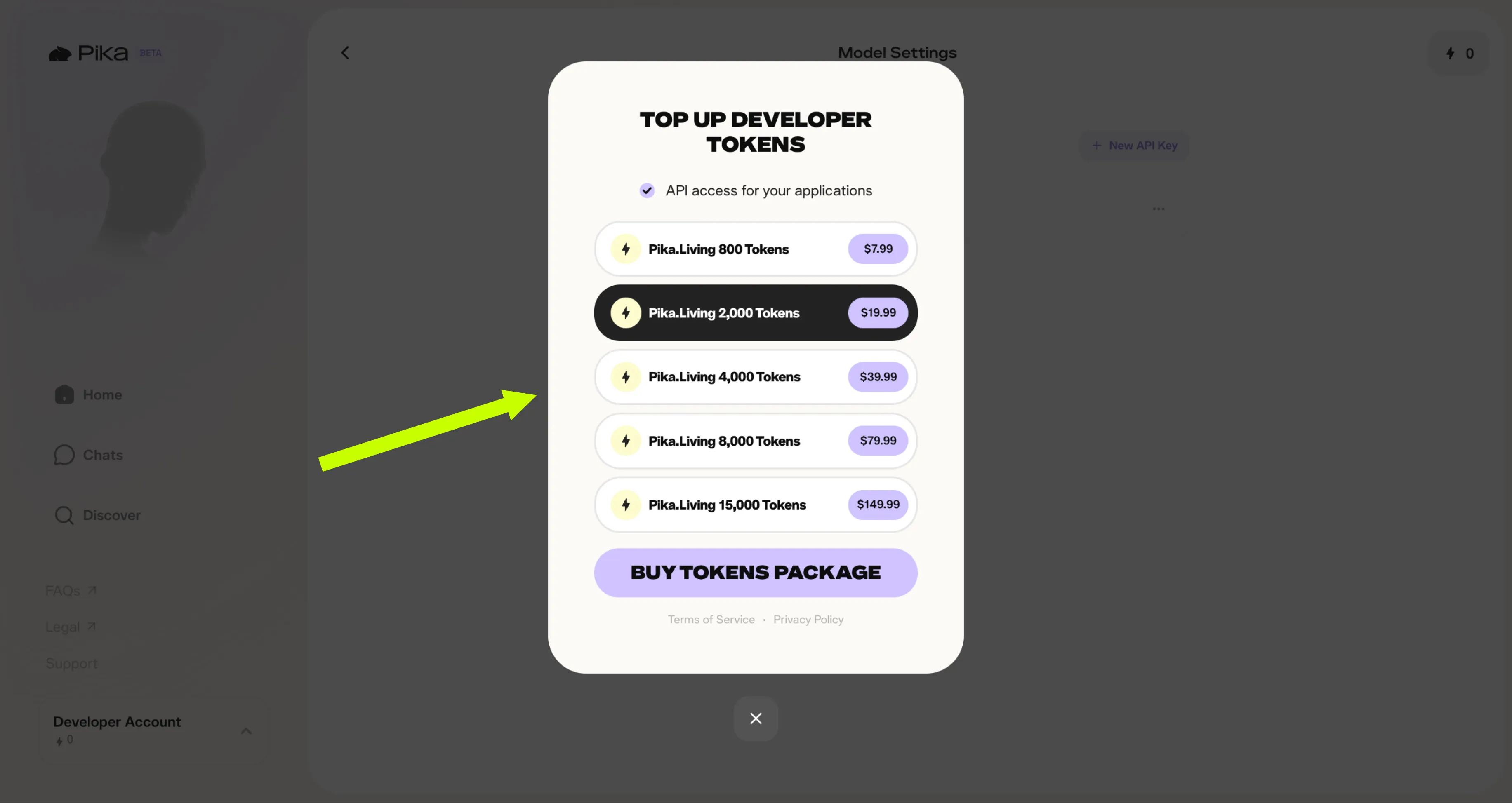
Automatic Billing Logic
The `pikastream-video-meeting` skill is designed with a proprietary financial fallback system. Before joining any meeting, the script performs a real-time balance check against your Pika Developer account.
Sufficient Balance: Script proceeds to initialization.
Insufficient Balance: Script pauses and generates a one-time payment link.
05. Local Environment Configuration
Bringing the Pika Skills into your local development environment requires a few standard technical prerequisites.
Step 1: Environment Variables
For persistent access, add this to your `.bashrc` or `.zshrc` profile.
Step 2: Installing the Skill
AI agents like Claude Code will automatically parse the `SKILL.md` file and verify the platform compatibility.
System Requirements
- PY
Python 3.10+
Required for the core streaming logic and async orchestration of the video feed.
- FF
FFmpeg (Optional)
Highly recommended for real-time audio format conversion during the voice cloning workflow.
06. Functional Command Reference
Interact with your AI agent naturally. The skill exposes a set of powerful subcommands for granular session control.
Jjoin
Initializes a PikaStream session and joins a Google Meet call.Lleave
Gracefully terminates an active session and releases GPU resources.Cclone-voice
Builds a persistent vocal identity from a short audio sample.Ggenerate-avatar
Uses Pika's internal diffusion balance to create a unique developer persona.07. Vocal Systems & Voice Cloning
Establishing a professional identity requires more than just a face. Vocal consistency is the bedrock of digital trust.
PikaStream's voice cloning engine is powered by a high-fidelity vocal synthesis model optimized for low-latency inference. Unlike traditional text-to-speech (TTS) engines that sound robotic and lack emotional cadence, Pika's engine captures the unique **timbre, breathiness, and prosody** of the original speaker.
Capture Protocol
To clone a voice, you need a minimum of 15 seconds of high-quality audio. The system performs a frequency analysis to map the unique characteristics of your vocal cords. For best results, use a microphone with minimal background noise and speak in a clear, conversational tone.
- - Avoid overlapping speech or music.
- - Maintain a consistent distance from the microphone.
- - Use the `--noise-reduction` flag if recording in a standard office environment.
Deployment Complexity
Once a voice profile is created, it is stored as a persistent `voice_id` within your Pika Developer account. This ID can be referenced across any number of meeting sessions, ensuring that your AI avatar always represents you with a consistent vocal identity.
Technical Insight
The system uses a zero-shot learning approach, meaning it does not require fine-tuning on your specific voice. It extracts a latent representation of your voice and applies it to the synthesis pipeline in real-time.
By combining this vocal engine with context-aware conversation logic, the PikaStream meeting bot achieves a level of natural interaction previously reserved for human participants. It can pause for breath, adjust its tone based on the sentiment of the conversation, and even handle interruptions gracefully.
08. Avatar Synthesis & Visual Continuity
While text and voice form the soul of the AI, the avatar is its physical vessel. High-fidelity visual synthesis is critical for maintaining professional presence.
PikaStream employs a multi-stage diffusion-based rendering pipeline. When an AI agent joins a meeting, it doesn't just play a looped video file. Instead, the rendering engine generates each frame in response to the agent's vocal output. This ensures that the **lip synchronization** is perfect and that the **micro-expressions** (blinking, head tilting, eyebrow movement) align with the emotional tone of the synthesized voice.
Latent Map
The system maps the audio frequencies to specific facial muscle movements within the latent space of the diffusion model.
Neural Render
The GPU cluster performs a fast-track pass to synthesize the visual frame, ensuring zero-lag continuity between the audio and video packets.
Stream Ingress
The finalized frames are injected into the Google Meet virtual camera interface via an optimized WebRTC pipeline.
Developers can leverage the `generate-avatar` command to create unique personas tailored to their brand identity. For example, a "Technical Support" agent might use a clean, professional aesthetic, while a "Creative Consultation" agent might utilize a more vibrant, stylized 3D rendered look. This visual flexibility allows businesses to maintain a consistent brand voice across all digital touchpoints.
09. Contextual Intelligence & Memory
A meeting bot is only as effective as the information it holds. PikaStream agents leverage your entire workspace history to drive meaningful conversation.
The skill uses a feature called **Workspace Synthesis** to build a dynamic system prompt for each meeting. Before the meeting starts, the agent scans your active directory for recent edits, reads the `README.md` for project goals, and checks your recent terminal logs for error patterns.
This information is then condensed into a high-density "Knowledge Injection" that is sent to the LLM (Large Language Model) powering the agent. During the meeting, if a participant asks, "What's the status of the API refactor?", the PikaStream bot can provide a precise technical update because it has 'seen' the code changes just seconds before joining the call.
10. Frequently Asked Questions
11. Advanced Troubleshooting
Internal protocols for resolving synchronization drift and authentication failures.
Session Drift
If the lips do not align with the audio, check your local internet latency. High jitter rates can cause packet desynchronization. Use a wired connection where possible.
Auth Failures
Ensure your `PIKA_DEV_KEY` is exported correctly in the shell where the script is running. Use `echo $PIKA_DEV_KEY` to verify the variable is active.
Balance Issues
If the script generates a payment link unexpectedly, visit the Developer Account dashboard to confirm your current token balance. Credits are consumed every 60 seconds of active rendering.
FFmpeg Errors
If voice cloning fails with a 'Decoder not found' error, ensure FFmpeg is installed and added to your system PATH. Re-run the installation with `brew install ffmpeg` (macOS) or `apt-get install ffmpeg` (Linux).
Conclusion
The Future
is Real-time
PikaStream 1.0 is more than a technical upgrade; it's a social evolution. As we move towards a world where AI agents handle increasing amounts of professional labor, the need for human-centric communication protocols becomes paramount.
This specification is subject to updates as the Pika Labs infrastructure continues to scale. For the latest API versions and model releases, please refer to the official Pika Developer documentation.